Carapace GO · tablet modules for the floor

Carapace GO

Look up, pick, confirm, sell and receive on a tablet, wherever the work is actually happening.

What it is

Carapace GO is the tablet side of the warehouse. Five modules covering stock lookup, order picking, confirmation, quick sales orders and purchase order receiving

Every module writes to the same record as the back office. A pick, a receipt or a counter sale lands the moment it happens, not at the end of the shift.

Inventory control, right on the floor.

  • Inventory managers
  • Warehouse supervisors
  • Stock controllers
  • Operations staff
  • Floor managers
  • Stock auditors
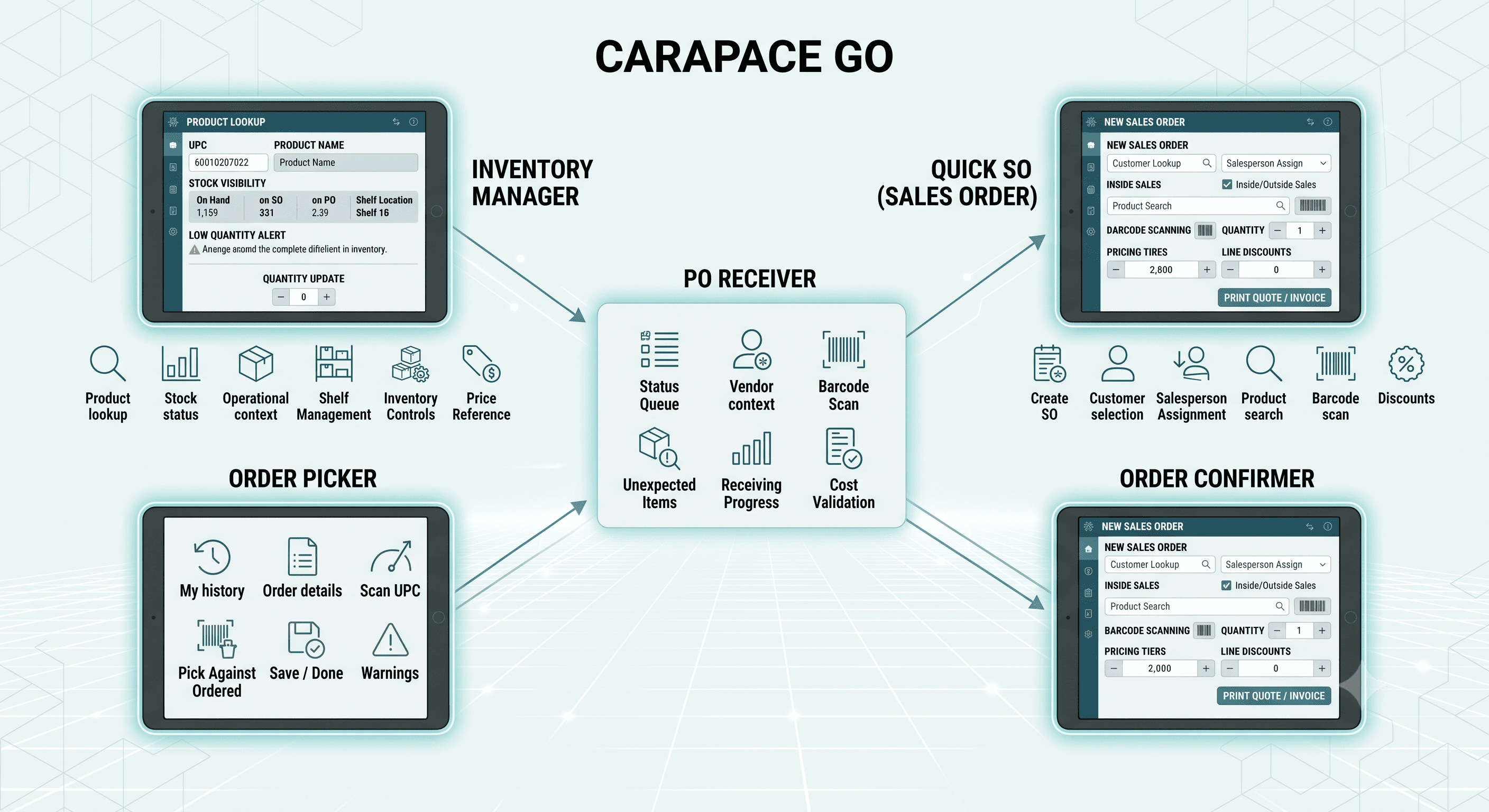
The five Carapace GO tablet modules: Inventory Manager, Order Picker, Order Confirmer, Quick SO and PO Receiver, each shown on a tablet with its main capabilities.
01 / The modules

Five modules on one tablet

01

Inventory Manager

Look up. Verify. Adjust.

Stock visibility, at the rack. Find a product by model, UPC or name and see what is genuinely on hand before anybody promises it to a customer.

  • Product lookup
  • On hand, on SO, on PO
  • Last sale and last PO
  • Aisle, row and shelf
  • Low quantity alerts
  • Tiered price reference
  • Moving history
  • Quantity updates
02

Order Picker

Pick against the order.

Open orders, scan the expected UPC, pick against the quantity ordered. If a line is short, the picker knows before the order is closed.

  • Recent and reopened orders
  • My history
  • Order list and details
  • Scan expected UPC
  • Pick against ordered
  • Save and done
03

Order Confirmer

Verify before it ships.

A second pair of eyes between picking and packing. Somebody else checks the tote, and the wrong box stops at the dock.

  • Review picked quantities
  • Verify item accuracy
  • Confirm completeness
  • Fewer wrong shipments
  • Handoff to packing
04

Quick SO

Sell from the floor.

A full sales order on a tablet, not a stripped-down entry screen. Customer, salesperson, pricing, discounts, totals, then print the quote or the invoice.

  • Create an order on the tablet
  • Customer and salesperson
  • Inside and outside sales
  • Product search and barcode scan
  • Price tiers and discounts
  • Freight, taxes and fees
  • Print quote or invoice
05

PO Receiver

Book it in as it lands.

Receiving against the PO at the dock. Scan it in, compare ordered against received, and record whatever turned up that nobody expected.

  • PO queue by status
  • Vendor and invoice context
  • Barcode and UPC scan
  • Ordered against received
  • Partial receiving
  • Unexpected items
  • Cost validation
02 / What it changes

Carapace Go for your business

On the floor

  • Stock questions get answered at the rack, by the person asking
  • The wrong item gets caught at the tote, not by the customer
  • Receiving happens at the dock, not on a clipboard typed up later
  • A short pick is flagged while the picker is still standing in the aisle
  • One tablet covers lookup, picking, confirming, selling and receiving

In the office

  • Stock figures move as the work happens
  • Counts and adjustments carry the person and the location
  • An order taken on the floor lands in the same ledger as everything else
  • Received quantities and costs are checked before they are posted
  • Fewer wrong shipments, and fewer credit notes a month later

Put a tablet on your floor

Bring us the job that costs your team the most walking. We will show you the module that covers it.

Book a demo

← All products